Leads and requests
A lead is anyone who has asked about work and does not have a price yet. Put every one in PropertyWorks the moment it arrives, so nothing lives on a sticky note or in a text thread.
A phone call or a text
Start an estimate while you are still on the phone. You do not have to finish it.
- Open Pipeline and press New Estimate.
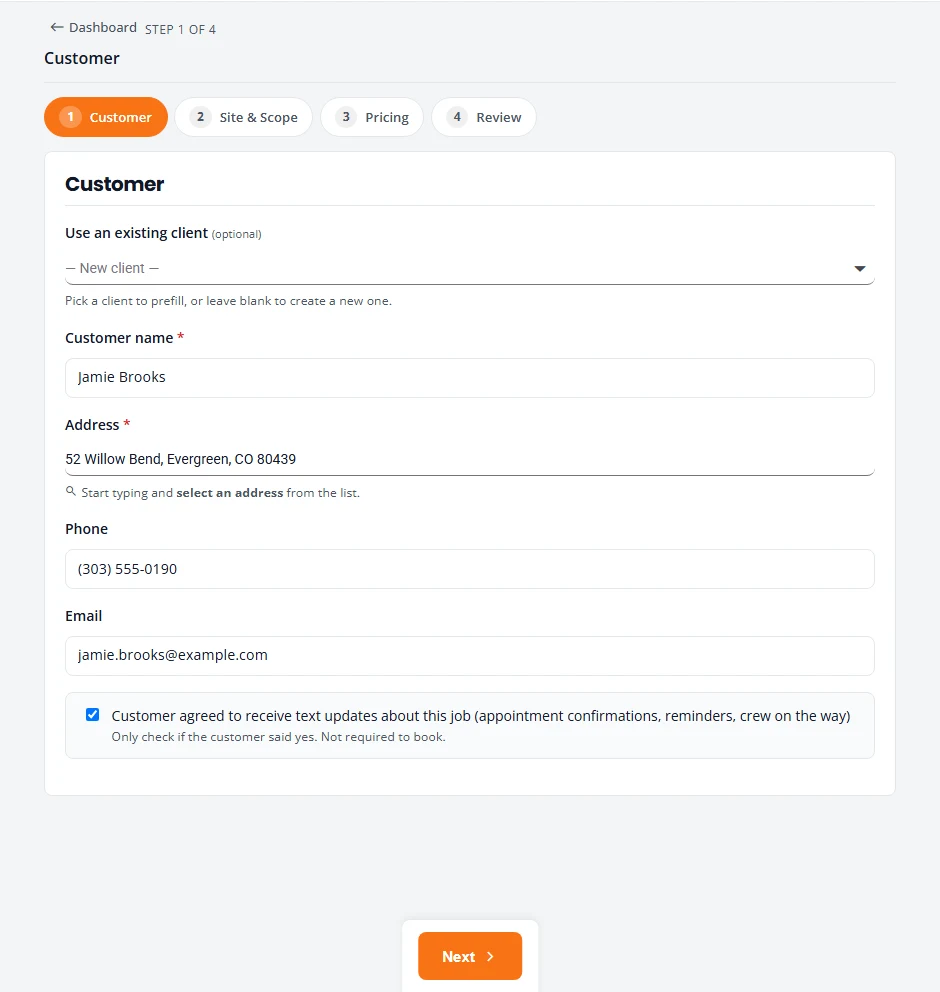
- On the Customer step, type the name, address, phone and email. Start typing the address and pick it from the list.
- Press Next. On Site & Scope, write what they asked for in Site notes.
- Stop there if you need to. Your work is saved as you go. Wait for Saved to show near the top before you leave the page.
The unfinished estimate waits at the top of Pipeline under In-Progress Estimates. Press Resume when you are ready to price it, or Delete if it came to nothing.
A request from your website
If the request form on your website is connected to PropertyWorks, each request becomes a job without anyone retyping it.
- The request appears on Projects under Leads, as a New Lead.
- It also appears in your Action Queue under Leads to contact.
- The customer’s name, phone, email and address are filled in for you.
- What they asked for, such as the service, how often, the date they would like and their message, is saved in the job’s site notes.
- If they ticked the box for text updates on your form, that is recorded with the date.
Call the customer, then build the estimate. See Estimates.
When a lead goes nowhere
- On Projects, find the job and open the menu at the end of its row (the three dots).
- Choose Advance state.
- Under New state, pick Lost. Add a note if you want to remember why. Press Advance.
The job moves to Lost / Cancelled at the bottom of Projects, out of your way but still on record.
Stuck on something? Email support@structra.tech and tell us what you were trying to do.