Text Messaging Terms
Last updated: October 13, 2026
Structra Technologies, LLC (“Structra”) runs the Structra and PropertyWorks software platforms. PropertyWorks is used by local service companies (for example tree care and home cleaning businesses) to schedule and manage jobs. Structra sends the text messages described below from +1 (844) 956-5721, either for our own service or on behalf of the service company you booked with. This page explains what we send, how you agree to it, and how to stop it.
The short version: Texts are only sent to people who agreed to them, and agreeing is never required to get a quote, book service, or use our software. Reply STOP to any message to stop, HELP for help. Message and data rates may apply. Message frequency varies.
1. What we send
All messages are transactional. We do not send marketing or promotional texts.
- Appointment updates for customers of a service company — booking confirmations, appointment reminders, schedule changes, and “your crew is on the way” notices for a job you booked. Each message starts with the name of the service company.
- Estimate links for customers of a service company — when the company sends you an estimate to review and sign, a link to it. Sent by the company’s staff, only if you agreed to texts about your quote (see section 2). Each message starts with the name of the service company. The signed copy of an estimate is sent by email, not by text.
- Job reminders for crew members — the next day’s job address and start time, sent to crew members of a company that uses PropertyWorks.
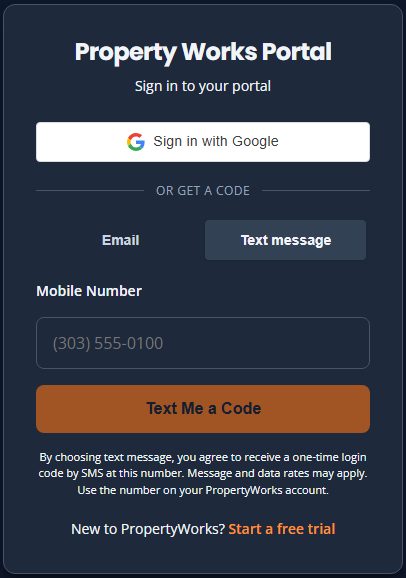
- Sign-in codes — a one-time code you request when you choose “Text message” on the PropertyWorks sign-in page.
- Inspector sign-in codes — for field inspectors using the Structra inspector portal: a one-time code to confirm a mobile number you add to your account, and, once you turn on sign-in by text, a one-time sign-in code each time you ask for one.
Example messages
- “Mountain Life Property Works: Your crew is on the way and should arrive around 9:30 AM. Reply STOP to opt out.”
- “J&J Elite Cleaning: Reminder - your cleaning is tomorrow, Oct 9, at 10:00 AM. Reply STOP to opt out.”
- “Mountain Life Property Works: Hi Jane Doe, your estimate #TS-1001 is ready to review and sign: (link) Reply STOP to opt out.” (estimate link)
- “Mountain Life Property Works: Tomorrow 7:00 AM - TS-1001 for Jane Doe. Site: 123 Main St, Conifer CO 80433. Map: (link). Crew lead: Stan. Reply STOP to opt out.” (crew reminder)
- “Your PropertyWorks login code is 482913. It expires in 10 minutes.”
- “Your Structra code to verify this phone is 305716. It expires in 10 minutes.” (inspector adding a number)
- “Your Structra sign-in code is 482913. It expires in 10 minutes.”
2. How you opt in
You receive texts only if you agreed to them in one of these ways. Agreeing is optional and is not a condition of any purchase or service.
- On a service company’s website. When you request a quote, an unchecked box reads “Text me about my quote and appointment (estimate links, confirmations, reminders, crew on the way). Message frequency varies. Msg & data rates may apply. Reply STOP to opt out, HELP for help.” with links to these terms and our Privacy Policy. Leaving it unchecked does not affect your request.
- By telling the service company. If you ask the company you booked with to text you, their staff record your agreement on your job in PropertyWorks, with the date and the wording you agreed to: “text updates about your quote and job (estimate links, appointment confirmations, reminders, crew on the way)”.
- As a crew member. Your employer records your agreement, with the date, when they add your mobile number to their crew list.
- By requesting a sign-in code. Choosing “Text message” on the PropertyWorks sign-in page and entering your number sends one code to that number. Nothing else is sent unless you agreed in one of the ways above.
- As a field inspector. In the inspector portal’s Account settings you enter your mobile number, confirm it with the code we text to it, and check “Text me my sign-in code at this number. Message and data rates may apply. Reply STOP to opt out, HELP for help.” Until you do, sign-in codes come by email. Removing the number or replying STOP turns sign-in texts off.
Until October 13, 2026 the website box read “Text me appointment updates (confirmations, reminders, crew on the way).” If you agreed to that wording, you get appointment texts only. A link to an estimate is texted to you only after you agree to the wording above.
What the opt-in looks like
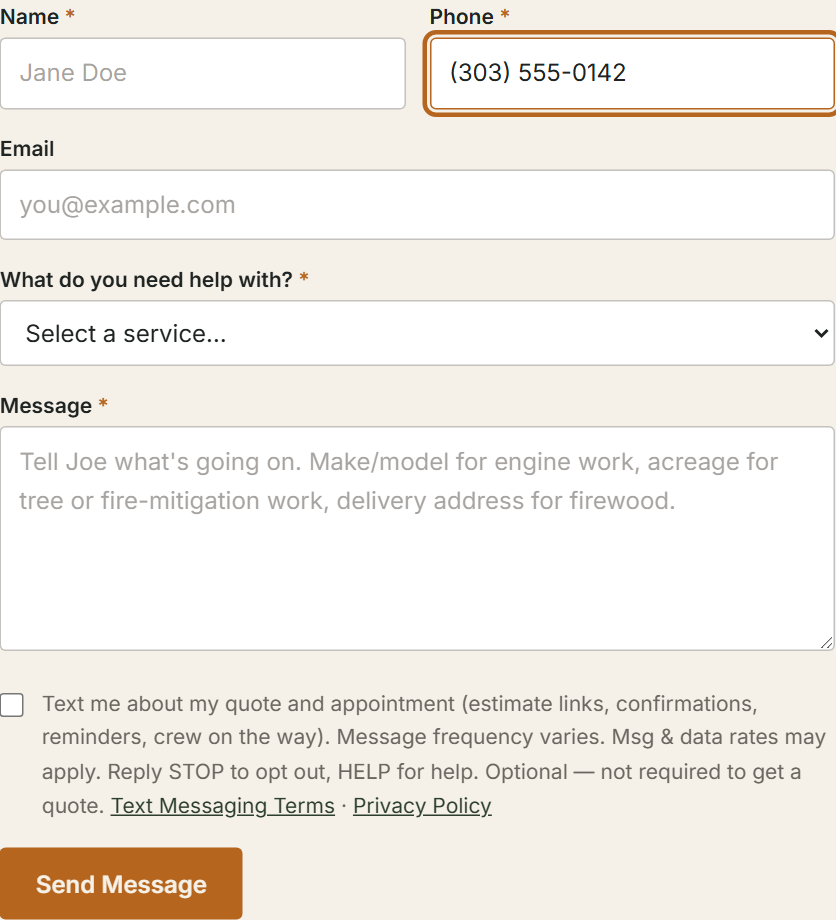
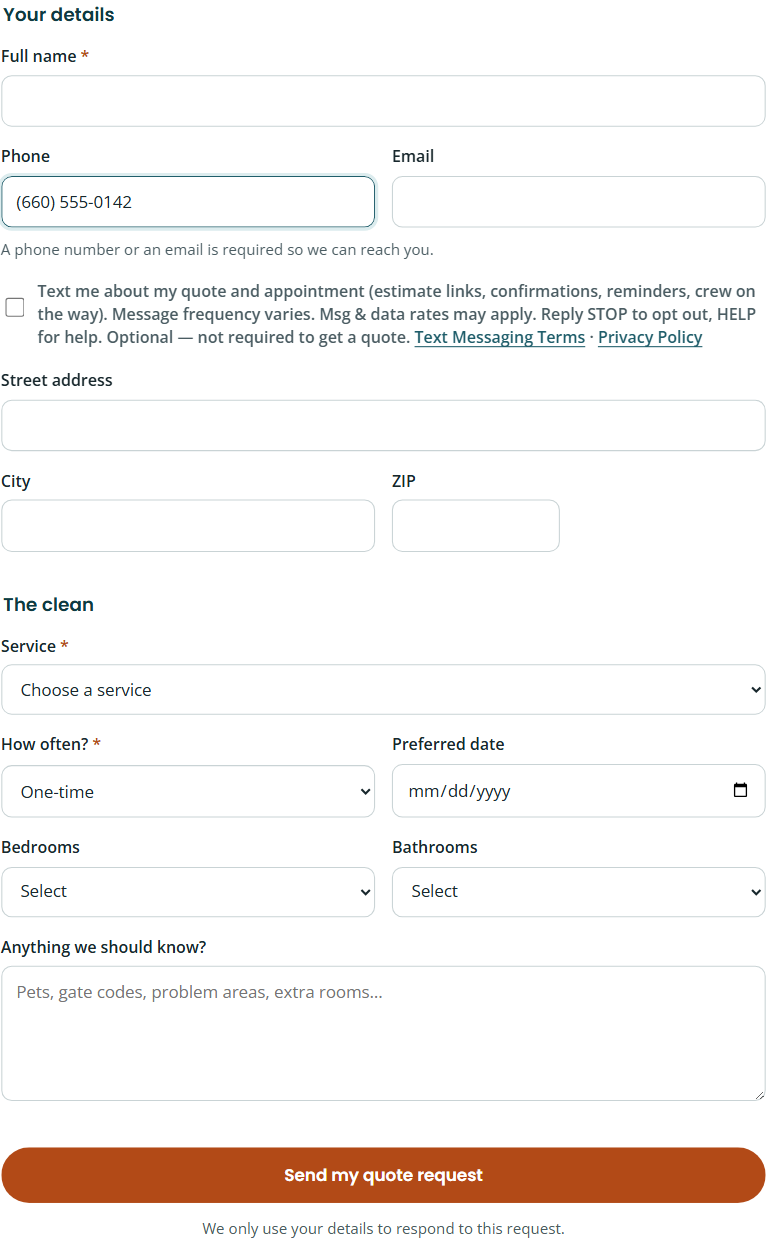
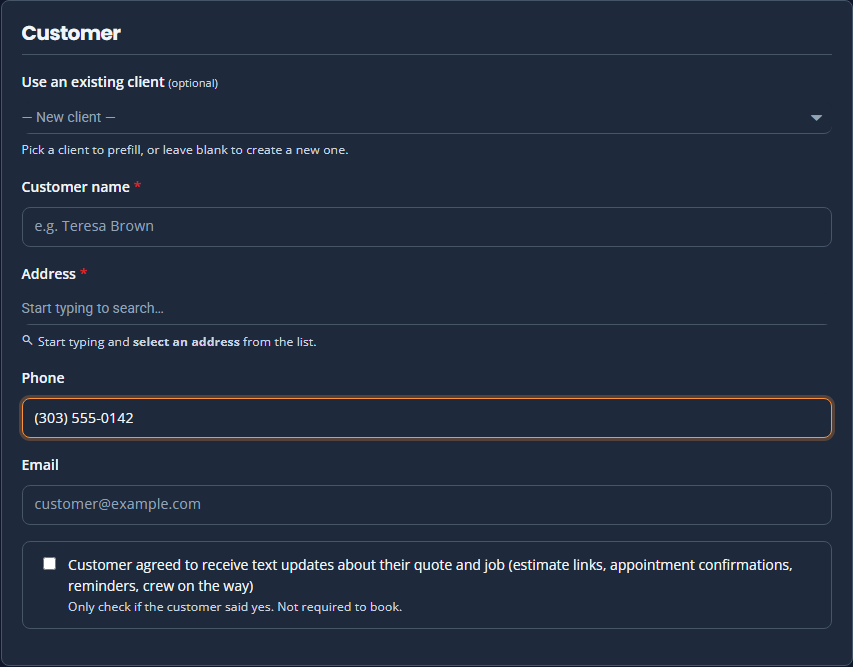
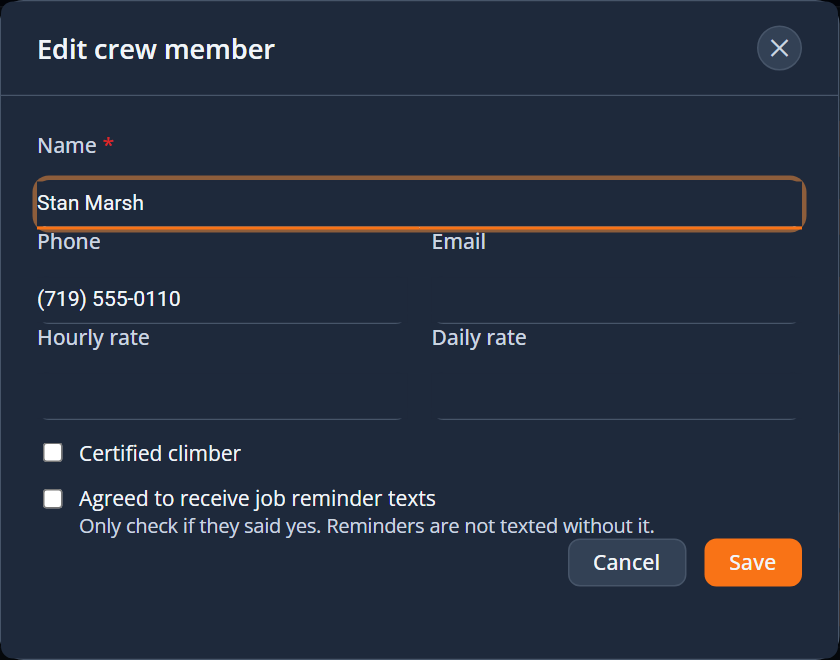
3. How often
Message frequency varies with your activity: customers typically receive 1–5 texts per job; crew members up to one reminder per workday; sign-in and verification codes only when you request them.
4. How to stop, restart, or get help
- Reply STOP (or STOPALL, UNSUBSCRIBE, CANCEL, END, QUIT) to any message to stop all texts from +1 (844) 956-5721. You will receive one confirmation and nothing after that.
- Reply START to start receiving texts again.
- Reply HELP for help, or email support@structra.tech.
- You can also ask the service company you booked with to stop texting you.
5. Costs and carriers
Structra does not charge for text messages. Message and data rates from your mobile carrier may apply. Carriers are not liable for delayed or undelivered messages. Supported carriers may change without notice.
6. Privacy
We do not sell, rent, or share your mobile number or your text-messaging opt-in consent with third parties or affiliates for their marketing or promotional purposes. Your number and the message content are shared only with our SMS delivery provider (Twilio) to deliver the messages, and with the service company you booked with, who already has your contact details. See our Privacy Policy for more.
7. Contact
- Email: support@structra.tech
- Text number: +1 (844) 956-5721 (reply HELP)
- Company: Structra Technologies, LLC, Evergreen, Colorado
These terms are part of our Terms of Service.